Wobblies: A Full-Color Dingbat Font for Creative Projects
What Exactly is a Dingbat Font?
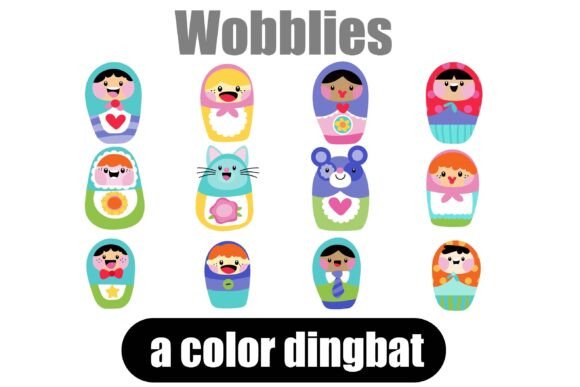
If you're looking for a way to inject immediate personality and visual interest into your projects, the Wobblies dingbat font is a standout tool to have in your design kit. At its core, Wobblies is a collection of 26 adorable, matryoshka-style dolls, delivered as an OpenType full-color SVG font. This means each letter you type on your keyboard doesn't produce a standard character—it renders a vibrant, detailed, and charming little graphic. Dingbats are essentially a designer's secret weapon, offering a library of ready-to-use mini graphics that can save you hours of searching for or creating individual illustrations. They bring flair, fun, and genuine functionality to any creative work, from professional branding to personal craft projects.
The visual character of Wobblies is distinctly playful and whimsical. Each doll in the set has its own unique personality, featuring bold colors, friendly faces, and intricate decorative details reminiscent of traditional nesting dolls. This style isn't just cute; it carries a sense of warmth, handcrafted quality, and nostalgic charm. The Wobblies typeface functions as a creative font that doesn't take itself too seriously, making it perfect for projects that aim to feel approachable, joyful, and full of character. It’s a premium font asset that acts as a complete set of illustrations, offering more visual consistency than sourcing random clip art from different libraries.
Where and How to Use the Wobblies Font
The real power of a dingbat font like Wobblies lies in its versatility across a wide range of applications. It shines brightest where visual engagement is key. Think about packaging design for a children's product or a boutique bakery—using a Wobblies doll as a spot illustration on a label or tag adds an instant, cohesive brand element. For social media graphics, these icons can be used as standalone visuals, decorative bullet points, or engaging accents in Instagram Stories and Facebook posts, helping to break up text and capture attention in a crowded feed.
For those in editorial design or publishing, Wobblies can enliven newsletters, magazine sidebars, or chapter headings in a themed cookbook or activity book. Entrepreneurs and small business owners can leverage the font in logo design elements, thank-you cards, or website banners to create a memorable brand identity. Crafters and hobbyists will find it invaluable for creating custom merchandise like stickers, t-shirts, tote bags, and greeting cards. The key is to see Wobblies not as a text font, but as a design asset—a library of consistent, scalable vector graphics that integrate seamlessly into your workflow.
Influence on Your Project's Visual Language
Integrating a font like Wobblies does more than just add a pretty picture; it actively influences the perception and hierarchy of your design. Its playful nature can soften a corporate tone, making a brand feel more human and relatable. When used as a recurring motif, the dolls can become a recognizable element of your visual system, enhancing brand consistency across different touchpoints. In terms of visual hierarchy, a well-placed dingbat can act as a focal point, guiding the viewer's eye to important information or creating a natural pause in a dense layout of text.
However, it's crucial to consider context. While perfect for audience engagement in many scenarios, Wobblies might not suit a formal financial report or a minimalist tech startup. Its strength is in its expressiveness, which pairs best with brands and projects that value creativity, warmth, and a touch of whimsy. It's a display font in the truest sense—meant for impactful, short-form use rather than body copy.
Practical Considerations for Working with Wobblies
Before diving in, a few practical notes will ensure a smooth experience. As a full-color SVG font, Wobblies requires a compatible application to display its vibrant hues. It installs like any standard .OTF file. On a Mac, this is typically done via FontBook, while Windows users can use their preferred font manager or the Control Panel. It's important to note that in programs that do not support color fonts, the characters will render as solid black silhouettes. You'll know your software is compatible when the dolls appear in color on your canvas. As of now, major applications like Adobe Illustrator, Photoshop, InDesign, Silhouette Studio, QuarkXPress, and Inkscape support this technology.
When choosing a font like Wobblies, evaluate its fit with your project's overall tone. Does the matryoshka style align with your audience's expectations? Test it in context. Place a few dolls next to your primary serif font or sans serif font to see how they interact. The goal is complementation, not competition. Review all 26 characters to understand the full range of expressions and decorations available, as this variety can be used to tell a subtle story or differentiate sections of a project.
From a licensing perspective, ensure the commercial font license covers your intended use, whether for client work, merchandise, or digital products. This is standard practice with any premium font or design asset. Finally, while Wobblies is a creative font, remember that readability of your main message is paramount. Use the dolls as accents—beside a headline, as a bullet list icon, or as a watermark—so they enhance rather than overwhelm your core content. By treating Wobblies as a specialized graphic tool within your broader typographic toolkit, you can unlock its full potential to make your projects instantly more engaging and visually distinctive.