Necktie Guy: A Full-Color Font for Distinctive Design
When you're working on a project that needs to stand out, the typeface you choose carries significant weight. A standard sans serif font is reliable, but it rarely makes a bold statement. This is where a creative font like Necktie Guy enters the conversation. It’s not just a collection of letters; it’s a full-color (SVG) font where each character is crafted from illustrated neckties, offering an immediate injection of personality and visual interest that standard fonts can't match.
Understanding the Visual Style and Personality
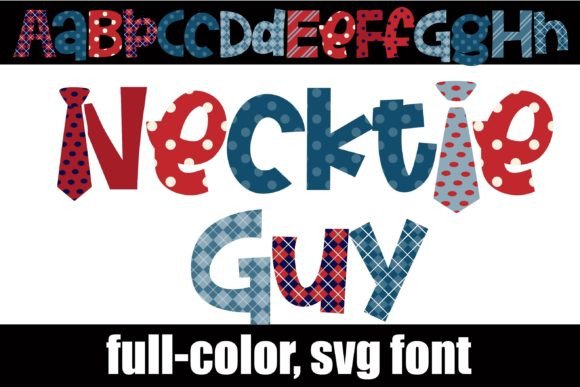
At its core, Necktie Guy is a display font. Its strength lies in its bold, illustrative nature. The characters are formed from colorful necktie patterns, giving the font a textured, almost tactile quality. Because it's an OpenType full-color font, the ties render in vibrant hues—think rich blues, reds, and patterns—directly in your design software. This is a modern typography advancement; the color is embedded in the font file itself.
It’s important to note a key feature: an alternate case. Accessing different letters through your system's character map or in Silhouette Studio unlocks additional color variations and tie styles. This allows for greater creative control, letting you mix and match to avoid repetition in a headline or logo. The personality of Necktie Guy is inherently playful, professional in a quirky way, and unmistakably thematic. It evokes a sense of occasion, business, or celebratory events, depending on the context you build around it.
Where This Creative Font Shines: Practical Applications
A font as distinctive as this has specific sweet spots. It’s not your body copy solution. Instead, think of Necktie Guy as a specialist tool in your design assets kit. Its primary role is in titles, headers, and short, impactful statements.
- Branding and Logo Design: For businesses in men's fashion, grooming, event planning, or even a blog with a sophisticated yet approachable voice, this font can form the cornerstone of a memorable logo. It communicates a specific niche instantly.
- Editorial and Publishing: Imagine the chapter titles in a book about corporate culture, the header on a Father's Day card, or the cover of a magazine for groomsmen. Necktie Guy adds thematic flair without needing additional graphics.
- Marketing and Social Media: Grab attention in a crowded feed. Use it for sale announcements, event invites, or profile banners on platforms like Instagram or Pinterest. It’s built for visual punch in social media graphics.
- Packaging and Physical Products: On a gift box for a tie subscription service, a label for a boutique clothing line, or signage for a pop-up shop, this font adds a layer of curated style that aligns perfectly with the product.
- Personal and Craft Projects: For hobbyists using Silhouette machines, it’s ideal for creating custom apparel, party decorations, scrapbook titles, and personalized gifts. The compatibility with Silhouette Studio makes it a go-to for crafters.
Making It Work: Integration and Font Pairing
Introducing a premium font like this requires a thoughtful approach to maintain professionalism and readability. The goal is to let Necktie Guy be the star while supporting it with complementary typefaces.
Pairing with Simplicity
Because Necktie Guy is highly detailed and colorful, it demands a calm counterpart. A clean, neutral sans serif font or a simple serif font works best for any subheadings or body text. Think of fonts like Helvetica, Open Sans, or Lato. A script font or another handwritten font would likely create visual noise and reduce overall readability. The pairing should create a clear visual hierarchy: the creative font for impact, the supporting font for information.
Technical Considerations for a Smooth Workflow
Installation is straightforward—treat the .otf file like any other font. For Mac users, FontBook is the standard; on Windows, use your Control Panel's font manager. Remember the crucial compatibility note: color fonts will show as black in non-compatible programs. If you see it as a solid black silhouette in your font preview, don't be alarmed. The color will appear correctly when you type on your document canvas in supported software like Adobe Illustrator, Photoshop, QuarkXPress, Inkscape, or Silhouette Studio.
Always test the font in your specific design environment before committing to a final project. Check how it renders at different sizes—while excellent for large titles, it may lose detail at very small point sizes. Review the alternate characters in your glyph map to explore all the design possibilities the typeface offers.
Evaluating Fit and Licensing
Is Necktie Guy the right commercial font for your project? Ask yourself these questions:
- Does my project's theme align with the font's personality? It's perfect for business, celebration, and fashion. It might be less suitable for a nature blog or a minimalist tech startup.
- Am I using it for its intended purpose—as a display font for headlines and logos?
- Have I considered the technical requirements and ensured my primary design software supports full-color SVG fonts?
- For commercial use, have I reviewed the licensing agreement to ensure it covers my intended application, whether for client work, merchandise, or digital products?
Ultimately, Necktie Guy is more than just a novelty. It's a tool for adding a specific, high-quality aesthetic that can elevate a design from generic to themed and engaging. Used strategically, it strengthens brand identity, captures attention, and communicates a message before a single word of body copy is read. Its value lies in its ability to combine the reliability of a vector-based font with the visual richness of color illustration, making it a standout choice for projects that need to dress to impress.