Crayon Wrapper: A Full-Color SVG Font for Playful Branding
There's a distinct joy in picking up a fresh crayon. The texture, the vibrant color, and the imperfect, waxy line it leaves behind are instantly nostalgic. Crayon Wrapper captures that feeling in digital form. This isn't just another handwritten font; it's a full-color SVG typeface that brings the textured, colorful look of crayon lettering directly into your design projects. For designers, brand strategists, and content creators, it offers a unique tool to inject personality and warmth into work that needs to feel approachable, creative, and fun.
More Than a Monochrome Typeface
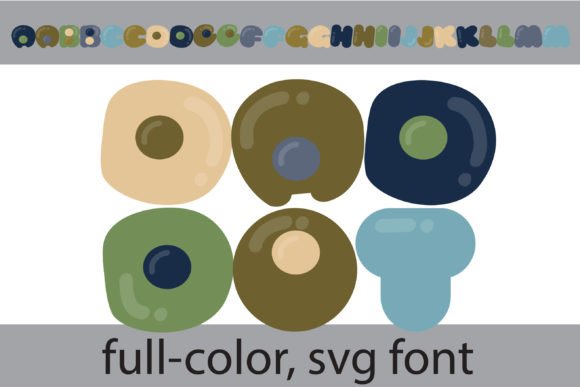
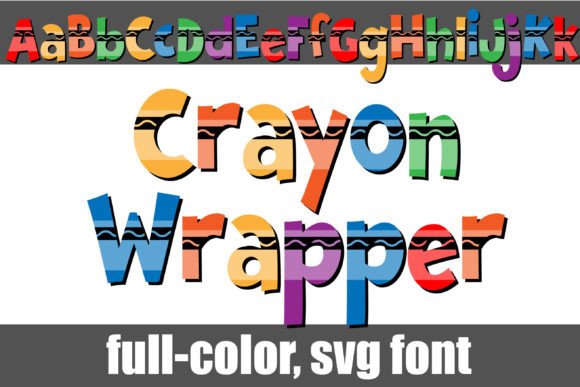
The primary visual characteristic of Crayon Wrapper is its authentic crayon texture. Each letter appears as if drawn by hand with a chunky crayon, complete with the slight grain and uneven pressure that makes the medium so charming. As an OpenType full-color (SVG) font, the letters are rendered in vibrant colors right out of the box. This means the "C" might be a bold red, the "r" a sunny yellow, and so on, creating a dynamic, multi-hued word without any extra work on your part.
It's crucial to understand how this premium font functions. Install it like any standard .otf file—via FontBook on a Mac or your preferred font manager on Windows. The magic happens in compatible software. While many programs will show the font in black during selection, you'll see the full-color effect once you type. Adobe Illustrator, Photoshop, InDesign, Silhouette Studio, Quark, and Inkscape are among the applications that fully support full-color SVG fonts. This compatibility is key to leveraging its full potential.
Strategic Applications for Maximum Impact
Where does a font like Crayon Wrapper truly shine? Its personality is bold, so it’s best suited for projects where you want to make a statement and evoke specific emotions. Think of it as a display font for headlines, logos, and short, impactful phrases rather than body text.
- Brand Identity & Logo Design: For brands targeting families, children's products, educational services, or any business with a playful, hands-on ethos, Crayon Wrapper can form the core of a memorable logo. It immediately communicates creativity and approachability.
- Packaging & Editorial Design: Imagine this font on product packaging for artisanal crafts, snacks, or party supplies. In editorial design, it can create captivating chapter titles or pull quotes in magazines and blogs aimed at a creative audience.
- Digital & Social Media: It’s a powerhouse for social media graphics, YouTube thumbnails, Instagram stories, and website banners. The color and texture stop the scroll and convey energy. It’s equally effective for email headers that need to stand out in a crowded inbox.
- Personal & Commercial Projects: From greeting cards and wedding invitations to T-shirt designs and printable wall art, this creative font adds a handmade touch. For small business owners, it can differentiate marketing materials from the sea of clean, minimalist sans serifs.
The key is context. Crayon Wrapper won't suit a law firm's annual report, but it could be perfect for that same firm's internal team-building event flyer. Its strength lies in its ability to break down formality and build an emotional connection through visual nostalgia.
Integrating Crayon Wrapper into Your Design Workflow
Adopting a new typeface, especially one as distinctive as this, requires thoughtful integration. Here’s how to approach it practically.
Evaluating Project Fit and Readability
Always start by asking: Does this font's personality align with my project's message and audience? Its playful nature is an asset for some goals and a liability for others. Because of its textured, colorful style, readability considerations are paramount. Use it for short bursts of text—headlines, logos, calls-to-action. For longer copy, pair it with a highly legible sans serif font or a clean serif font for body text. This creates a clear visual hierarchy and ensures your message is communicated effectively.
Mastering Font Pairings
The right font pairing can elevate your design. Crayon Wrapper pairs well with fonts that provide contrast without competing for attention. A geometric sans serif like Montserrat or Poppins offers a modern, clean counterbalance. A classic serif like Lora or Merriweather can ground the playfulness with a touch of sophistication. Avoid pairing it with other highly decorative, script, or handwritten fonts, as this can create visual chaos and undermine professionalism.
Leveraging Alternate Characters
The font includes an alt version accessible through your system's character map. This version contains additional colors for all the letters, giving you more control over the color palette of your text. This is a fantastic feature for brand consistency, allowing you to match the font's colors more precisely to your brand's color scheme across different applications.
Understanding Commercial Licensing
Before using Crayon Wrapper in any commercial project—whether it's a client logo, a product you sell, or marketing materials—verify the licensing terms. Most commercial fonts require a license for each user or for specific types of use. Reviewing the license ensures you're using this design asset legally and respecting the work of its creators, which is a fundamental aspect of professional practice.
Crayon Wrapper is more than just a font; it's a design element that carries a specific mood. Used strategically, it can transform a standard layout into something memorable and engaging. It reminds us that sometimes, the most effective design doesn't come from the latest trend in modern typography, but from tapping into a universal, tactile experience that everyone understands. Test it in your next creative brief where a dose of heartfelt, colorful energy is needed.