Krayola: Reviving Playful Energy in Your Designs
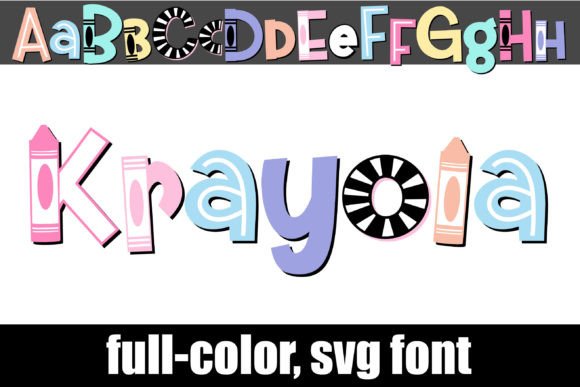
If you've ever watched a child draw, you know there is a specific, unapologetic boldness to their strokes. That is the exact energy captured in Krayola, a premium font that moves beyond standard vector outlines to embrace the texture and vibrancy of a wax crayon. As a full-color OpenType SVG font, Krayola doesn't just shape your text; it colors it automatically. It mimics the look of youthful lettering without requiring you to manually apply gradients or textures to every individual letter. For designers, marketers, and content creators, this represents a massive workflow shortcut while delivering a high-impact visual result.
Unlike a standard display font that relies purely on shape, Krayola relies on texture and color depth. It captures the slight inconsistencies and the waxy sheen of a crayon stroke. This makes it an incredibly specific creative font with a distinct personality. It is not trying to be sleek or ultra-modern; instead, it leans into nostalgia and warmth. When you install this typeface, you aren't just adding letters to your library; you are adding a piece of modern typography that bridges the gap between digital precision and analog imperfection.
Understanding the Technical Reality of SVG Fonts
Before diving into the design applications, it is crucial to understand how Krayola functions under the hood. This is an OpenType full-color (SVG) font. In practical terms, this means the font file contains bitmaps or complex vector data that allows for multi-colored, textured glyphs. You install it just like any standard .otf font, whether you are using FontBook on a Mac or a font manager on Windows. However, the rendering experience varies significantly depending on your software.
A common point of confusion for small business owners and hobbyists is seeing the font appear solid black in their preview windows. This is normal. Even in programs that fully support color fonts, the selection preview often defaults to a monochrome silhouette. The true test of compatibility happens when you actually type onto the canvas. If you see the colorful, crayon-textured letters, your software supports it.
Programs like Adobe Photoshop, Illustrator, InDesign, Silhouette Studio, Quark, and Inkscape currently have robust support for this technology. If you are using a program that does not support SVG color fonts, the text will simply render as a solid black letter. While the black version is still legible, you lose the defining characteristic of the typeface. Therefore, if your primary workflow involves older software or platforms that haven't updated their rendering engines, you should verify compatibility before relying on Krayola for critical brand identity work.
The Psychology of Play: Where to Use Krayola
The visual style of Krayola is inherently youthful, energetic, and approachable. This makes it a specialized tool rather than a universal one. You wouldn't use this font for a corporate law firm's annual report, but it is an absolute powerhouse for projects targeting families, children, or adults seeking a sense of whimsy and fun.
Packaging and Product Design
For packaging design, particularly in the toy, confectionery, or craft sectors, Krayola offers an immediate emotional connection. It signals that a product is fun and safe. It works exceptionally well for headers on packaging where you want to grab attention instantly. Because the texture is built-in, it maintains consistency across different print runs, ensuring that the "hand-drawn" look remains professional.
Digital Presence and Social Media
In the realm of web design and social media graphics, standing out in a crowded feed is difficult. Krayola provides an instant differentiator. It is perfect for Instagram stories, YouTube thumbnails, or blog headers related to parenting, education, or creative tutorials. The font's texture adds depth to flat digital screens, making the content feel more tangible. However, because SVG fonts can be larger in file size than standard vector fonts, it is best used for headlines and short call-to-actions rather than body text.
Editorial and Publishing
For editorial design, such as magazines or newsletters aimed at a younger demographic or the education sector, Krayola serves as an excellent accent font. It can be used for pull quotes, section dividers, or feature titles to break the monotony of standard sans serif font or serif font body copy. It injects personality into the layout without requiring complex illustration work.
Strategic Application: Hierarchy and Brand Perception
Using a handwritten font or a textured display font effectively requires a strategic approach to visual hierarchy. Krayola is a "loud" font. It demands attention. Therefore, using it for long paragraphs would be visually exhausting and detrimental to readability. Instead, it should occupy the top of your visual hierarchy.
Building Visual Contrast
The most effective way to utilize Krayola is through font pairing. Because Krayola is organic, textured, and irregular, it pairs beautifully with clean, geometric sans serif fonts. A clean sans serif provides a resting place for the eye, allowing the Krayola headlines to pop without overwhelming the viewer. For example, pairing a bold Krayola header with a light-weight Montserrat or Roboto body text creates a balanced, modern aesthetic that feels professional yet approachable.
Influencing Brand Perception
If you are a blogger, entrepreneur, or marketer, your typography choices speak volumes about your brand voice. Integrating Krayola into your brand identity tells your audience that you are accessible, creative, and perhaps a bit nostalgic. It breaks down the corporate barrier. It suggests that your brand doesn't take itself too seriously, which can be a powerful tool for building community and trust, particularly in lifestyle and creative niches.
Practical Evaluation and Licensing
When evaluating whether Krayola is the right addition to your design assets, you must consider the context of the project.
- Check the Alt Version: The font includes an alternate version accessible via your system's character map. This version contains additional colors for the letters. If the default primary color doesn't fit your palette, explore the alt version to see if a different hue works better for your specific project.
- Readability Testing: Always test your text at the size it will be viewed. While Krayola is legible at poster sizes, it may become muddy if used in very small print sizes (under 24pt) due to the texture details.
- Licensing: Ensure you review the commercial licensing terms. Most premium fonts have different tiers for desktop use (logos, print) versus web use (embedding fonts in code). Since SVG fonts can be heavy, web embedding is often restricted or technically challenging, so verify the license covers your intended usage.
Ultimately, Krayola is more than just a novelty; it is a functional design asset that solves the problem of adding texture and warmth to digital designs. By understanding its technical requirements and using it strategically within your layouts, you can leverage this typeface to create memorable, engaging content that resonates with audiences looking for a human touch. Whether you are designing a logo for a daycare center or creating graphics for a community workshop, Krayola brings the authentic, messy joy of creativity back into the digital workspace.