Elevate Your Designs with Looking Sharp Graduate
Sometimes, a project just needs that perfect finishing touch—a small, impactful graphic that instantly communicates a theme without a single word of explanation. If you've ever found yourself scrolling through endless stock image sites for a simple graduation cap or a stack of books, you know the time drain it can cause. This is where a well-crafted dingbat font like Looking Sharp Graduate transforms your workflow. It's not merely a typeface; it's a curated library of 26 distinct, high-quality graphics designed to inject personality and clarity into your creative work, specifically around the universal milestones of education and achievement.
More Than Symbols: A Practical Design Asset
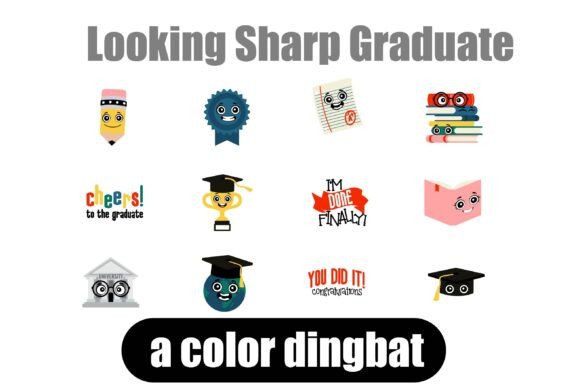
Dingbat fonts are often underestimated. In practice, they function as vector-based design assets that are infinitely scalable and seamlessly integrated into your text flow. Looking Sharp Graduate delivers 26 adorable and fun illustrations, from diplomas and pencils to apples and backpacks. Each glyph is rendered as a full-color SVG (Scalable Vector Graphic) within an OpenType font file. This means you get the vibrant, detailed look of a pre-colored illustration with the editing simplicity of typing a letter.
The practical applications are vast. For a teacher creating a classroom newsletter, typing a single character can now insert a cheerful school bus. A small business owner designing packaging for a tutoring service can add a scholarly owl icon next to a product name. The visual appeal lies in its consistent, charming style—every icon shares a cohesive aesthetic, ensuring your designs look polished and intentional, not like a patchwork of random clipart.
Understanding the Technology: SVG Fonts in Your Toolkit
As a premium font utilizing SVG technology, Looking Sharp Graduate requires a compatible environment to display its full-color glory. You install it just like any standard .OTF file—through FontBook on Mac or your system's font manager on Windows. However, its magic is unlocked in programs that support the OpenType-SVG format. Adobe Illustrator, Photoshop, InDesign, Silhouette Studio (Business Edition), QuarkXPress, and Inkscape are among the applications that will render the colors as intended.
A crucial point for your design workflow: in non-compatible software, the font will appear as a solid black silhouette. Even in some compatible programs, the font preview window may show it in black. The true test is to type a character on your artboard or document. If it appears in full color, you're set. This specificity makes it an ideal choice for digital design and professional print projects where you control the output environment, such as creating social media graphics in Photoshop or designing labels in Illustrator.
Strategic Applications for Maximum Impact
Integrating Looking Sharp Graduate effectively means thinking beyond decoration. Consider how these graphics can enhance visual hierarchy and audience engagement. In editorial design, a small icon can break up text-heavy pages in a school yearbook or alumni magazine. In packaging design, a graduate cap icon can subtly reinforce the product's purpose for a gift box or party supply. For brand identity work, especially for educational consultants, tutoring centers, or stationery brands, these icons can become part of a recognizable visual language used consistently across logo design elements, website banners, and promotional materials.
The font's strength is its thematic focus. It provides a ready-made solution for a specific niche—graduation and school—saving you the hours you'd spend commissioning custom illustrations. This efficiency is invaluable for content creators and marketers who need to produce timely content, like end-of-year celebration posts or back-to-school campaigns. The icons can be used as bullet points in a list, as decorative elements on invitations, or as part of a pattern for merch like tote bags or mugs.
Practical Guidance for Integration
When selecting Looking Sharp Graduate for a project, evaluate the tone. Its "adorable and fun" personality suits celebratory, youthful, and approachable contexts. It may not be the right fit for a solemn corporate report, but it's perfect for a kindergarten graduation flyer or a playful blog post about study tips. Always test the font at the scale you intend to use it. While SVG fonts are scalable, ensure the intricate details of each icon remain clear and legible at small sizes, especially for web design or mobile viewing.
For font pairing, the goal is balance. Because the dingbat characters are detailed and colorful, pair them with clean, simple sans-serif fonts for body text or a clear serif font for headlines. This contrast ensures the icons stand out without overwhelming the overall design. A script font could be used sparingly for a complementary headline, but let the dingbats be the primary visual accent.
Finally, review the licensing. As a commercial font, it typically comes with a license that permits use in projects for sale, like printed merchandise or digital templates. Confirm the specific terms to ensure it covers your intended use, whether for personal hobby projects or client work. By treating Looking Sharp Graduate as a specialized tool in your design assets kit, you can quickly add a layer of thematic polish and professionalism that resonates with your audience, making every graduation-themed project look intentionally sharp.