Okay Bouquet: Blending Sans Serif Clarity with Floral Charm
In a crowded digital marketplace, your brand’s voice needs to speak before a customer even reads a word. That’s where typography does the heavy lifting. While a standard sans serif font offers clean professionalism, and a script font adds elegance, finding a typeface that balances both personality and readability can be a challenge. Enter Okay Bouquet, a premium font that redefines modern typography by integrating pretty florals directly into the character structure. It is not just a typeface; it is a design asset that bridges the gap between industrial functionality and organic beauty.
The Anatomy of a Creative Font
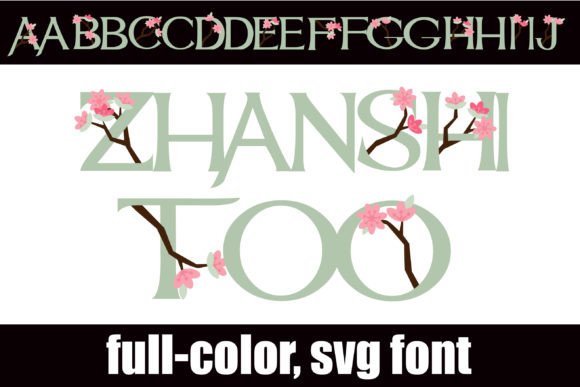
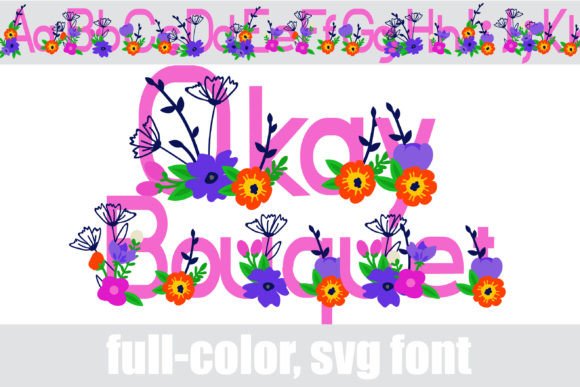
At its core, Okay Bouquet utilizes a solid sans-serif foundation. This ensures that the text remains legible and grounded, providing the necessary structure for headers, subheadings, and even short paragraphs. However, the magic lies in the details. The typeface features intricate floral illustrations woven into the letterforms. This isn't a standard overlay; it is a full-color font technology that allows the flowers to appear with realistic shading and vibrant hues right out of the box.
For designers and creators, this offers an immediate solution to a complex design problem. Instead of spending hours manually arranging floral vectors around standard text to create a logo, Okay Bouquet delivers that aesthetic instantly. It serves as a powerful tool for those looking to inject a sense of freshness and nature into their work without sacrificing the clean lines required for professional brand identity.
Mastering the Technology: Installation and Compatibility
Understanding how to deploy this creative font is crucial for a smooth workflow. Okay Bouquet is an OpenType full-color (SVG) font. Unlike standard fonts that rely on single-color fills, SVG fonts store color information within the file, allowing for multi-colored, textured, or gradient designs directly in your text layer.
Getting Started with Okay Bouquet
Installation follows the same path as any standard .otf font. Whether you are on a Mac using FontBook or a Windows user navigating the Control Panel, the file installs seamlessly. However, viewing the colors requires software that supports this advanced typography standard.
- Compatible Software: You will see the floral colors in programs like Adobe Photoshop, Illustrator, InDesign, Silhouette Studio, Quark, and Inkscape.
- The "Black Box" Issue: If you are using older software or web platforms that do not support SVG fonts, Okay Bouquet will render as a solid black silhouette. This is a technical limitation of the software, not the font.
- The Preview Glitch: Even in compatible programs, the font preview window or dropdown menu often displays the font in black. Do not be alarmed. Once you type on the document canvas, the full color palette will appear.
Additionally, Okay Bouquet includes an alternative case (alt case) with additional color options. This allows for further customization, ensuring your packaging design or social media graphics don't look identical to every other user of the font. You can access these variations through your system’s glyph map or the glyph panel in your design software.
Visual Hierarchy and Brand Perception
Choosing a typeface is a strategic decision that influences how your audience perceives your brand. Okay Bouquet positions a brand as approachable, artistic, and detail-oriented. It works exceptionally well for industries where aesthetics and nature are central to the value proposition.
Ideal Applications:
- Editorial Design: Use it for magazine covers or feature headlines in lifestyle, wedding, or gardening publications. It commands attention while setting a sophisticated tone.
- Digital Marketing: In the fast-scrolling environment of Instagram or Pinterest, this font stops the thumb. It adds visual texture to web design headers and email campaigns that standard fonts cannot achieve.
- Logo Design: For small businesses, particularly in the beauty, wellness, or boutique retail sectors, Okay Bouquet can serve as a standalone logo wordmark.
However, readability is paramount. Because Okay Bouquet is a display font, it is best suited for larger point sizes. Using it for body copy in a dense report would likely overwhelm the reader. Instead, pair it with a neutral, high-readability sans-serif or a simple serif font for the body text. This creates a clear visual hierarchy where Okay Bouquet draws the eye for the headline, and the supporting text provides the detailed information.
Practical Guidance for Implementation
When integrating Okay Bouquet into your next project, consider the medium. Because SVG fonts contain complex data, they can result in larger file sizes than standard vector fonts. This is rarely an issue for print or rasterized digital images (like JPGs or PNGs), but it is a consideration for live web text. For web projects, it is often better to use the font for static headers or graphics rather than dynamic body text to ensure fast load times.
Furthermore, think about the color environment. Okay Bouquet features its own internal colors, which means it may not automatically match your brand’s specific hex code. You should design your surrounding color palette to complement the tones already present in the font’s floral elements. Treat the font as a pre-designed illustration; your job is to build the environment around it.
Ultimately, Okay Bouquet is more than just a collection of letters; it is a solution for designers seeking to combine the reliability of modern typography with the timeless appeal of nature. By understanding its technical requirements and strategic applications, you can leverage this typeface to create designs that are not only beautiful but also memorable and effective. Whether for commercial use or personal passion projects, it offers a fresh perspective on what a sans serif font can be.