Educate Me: A Creative Font with School Supply Charm
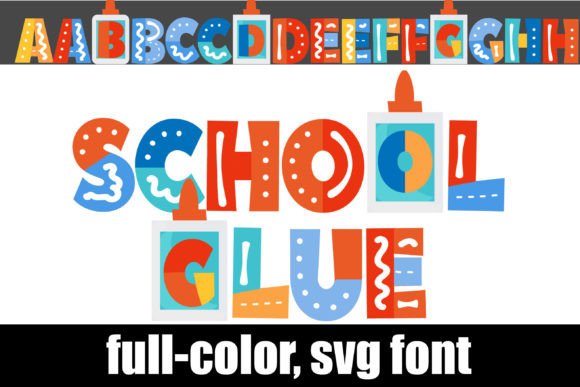
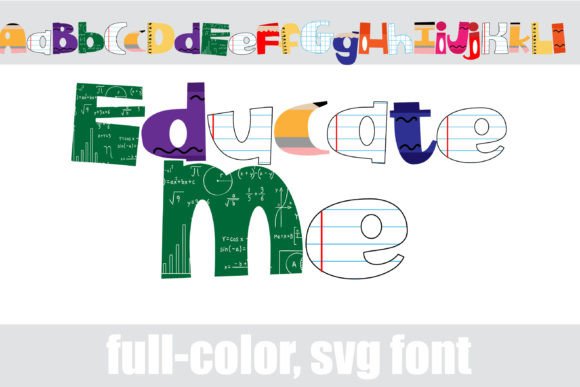
When you first encounter the Educate Me typeface, it’s impossible not to smile. This isn't just a set of letters; it is a full-color graphic element designed to evoke nostalgia and creativity. Imagine a typeface where the crossbars of your "A" are rulers, the dots on your "i" are pencil tips, and the serifs are erasers. That is the essence of this creative font. It is a playful, high-energy display font that integrates school supplies directly into the letterforms, making it a standout choice for designers looking to inject personality into their work.
As a premium font, Educate Me utilizes modern OpenType technology, specifically full-color SVG formats. This allows the font to contain multiple colors and gradients within a single glyph. Unlike standard vector fonts that require you to manually color different layers, this typeface comes pre-colored with vibrant, realistic textures of pencils, notebooks, and glue sticks. It is a perfect example of how modern typography has evolved beyond simple shapes to become true illustration assets.
Where to Use This Playful Display Font
Because of its intricate, illustrative nature, Educate Me functions best as a display font. You wouldn’t use it for body copy in a novel, but it shines when used for headlines, hero text, and large-scale graphics. Here are some practical applications where this font type excels:
- Publishing and Editorial Design: It is an obvious winner for children’s book covers, educational workbooks, and back-to-school marketing materials. The visual language of school supplies immediately communicates themes of learning, growth, and fun.
- Branding for Education Sector: If you are designing a logo design or brand identity for a tutoring center, a kids' crafting workshop, or a stationery brand, this font sets the perfect tone. It feels approachable and trustworthy.
- Digital Content and Social Media: In the fast-paced world of social media graphics, stopping the scroll is key. The colorful, textured nature of Educate Me grabs attention instantly. It is excellent for YouTube thumbnails, Instagram announcements for school events, or blog headers for parenting sites.
- Crafting and DIY Projects: For the hobbyist using cutting machines, this font is a game-changer. It works seamlessly with Silhouette Studio, allowing crafters to create stickers, decals, and scrapbook elements without needing to layer different colored vinyl.
Technical Realities: Compatibility and Color
While the aesthetic appeal of Educate Me is undeniable, using a full-color SVG font requires a bit of technical awareness. As a designer or content creator, you need to understand how this specific typeface behaves across different software environments.
The most critical factor is compatibility. Full-color SVG fonts are a relatively new innovation. While they install just like any standard .otf font—via FontBook on Mac or the Control Panel on Windows—not every program can read the color data.
Here is what you need to know to manage expectations and workflow:
- Non-Compatible Programs: If you try to use Educate Me in older software or basic text editors, the font will default to a solid black silhouette. You will lose the school supply details and colors, seeing only the outline shape.
- Preview Windows: Even in programs that do support color fonts, such as Adobe Illustrator, Photoshop, or Quark, the font preview window or dropdown menu often displays the font in black. Do not be alarmed by this. You will only see the full-color version once you actually type the text onto your canvas.
- Supported Software: To get the full "school supply" effect, ensure you are using compatible software. Adobe products, Inkscape, and Silhouette Studio (Designer Edition and above) are among the industry leaders that support this OpenType feature.
Design Strategy: Pairing and Readability
When incorporating Educate Me into a larger design system, balance is everything. Because this is a highly decorative and illustrative font, it pairs best with clean, neutral typography. Trying to pair it with a busy script font or a heavy handwritten font will result in visual clutter.
For the best results, combine Educate Me with a legible sans serif font or a traditional serif font for your subheadings and body text. For example, a clean geometric sans serif allows the playful nature of the display font to pop without overwhelming the viewer. This contrast helps establish a clear visual hierarchy, guiding the reader's eye from the catchy headline to the informative body copy.
Licensing and Commercial Use
For entrepreneurs and small business owners, understanding the licensing of design assets is crucial. Educate Me is typically a commercial font, meaning it requires a license for business use. Whether you are printing t-shirts, selling mugs with custom text, or using it in paid client work, ensure your license covers your specific output.
The investment in a high-quality, premium font like this often pays for itself in the professionalism it brings to a project. It elevates a design from "homemade" to "professionally crafted," which can significantly impact audience engagement and brand perception.
Final Thoughts on Visual Impact
Educate Me is more than just a font; it is a thematic toolkit. It solves the problem of how to make educational or stationery-related content feel vibrant and engaging. By leveraging the power of full-color SVG fonts, you can create designs that feel tactile and fun. Whether you are a publisher designing a textbook cover or a crafter making back-to-school stickers, this typeface offers a unique blend of illustration and typography that standard fonts simply cannot match.